Documentation Index
Fetch the complete documentation index at: https://checkly-422f444a-sync-playwright-reporter-changelog-v1-5-0.mintlify.app/llms.txt
Use this file to discover all available pages before exploring further.
This guide will help you instrument your Flask application(s) with OpenTelemetry and send traces to Checkly.
Step 1: Install the OpenTelemetry SDK
Install the relevant OpenTelemetry packages:
pip install opentelemetry-distro \
    opentelemetry-exporter-otlp
opentelemetry-bootstrap command to automatically install any OTel libraries based on your current Python app.
opentelemetry-bootstrap --action=install
Step 2: Initialize the instrumentation
Notice the HttpHeaderSampler class. This is a custom, head-based sampler that will only sample spans that are generated
by Checkly by inspecting the trace state. This way you only pay for the egress traffic generated by Checkly and not for
any other traffic.
from opentelemetry import trace
from opentelemetry.sdk.trace import TracerProvider
from opentelemetry.exporter.otlp.proto.http.trace_exporter import OTLPSpanExporter
from opentelemetry.sdk.trace.sampling import Sampler, SamplingResult, Decision
from opentelemetry.sdk.trace.export import BatchSpanProcessor
from opentelemetry.instrumentation.flask import FlaskInstrumentor
from opentelemetry.instrumentation.requests import RequestsInstrumentor
from flask import Flask, request

class HttpHeaderSampler(Sampler):
    def get_description(self) -> str:
        return "HttpHeaderSampler"
    def should_sample(
            parent_context, trace_id, name, kind=None, attributes=None, links=None, trace_state=None
    ) -> SamplingResult:
        if request.headers.get('tracestate') == 'checkly=true':
            return SamplingResult(Decision.RECORD_AND_SAMPLE)
        else:
            return SamplingResult(Decision.DROP )

trace.set_tracer_provider(TracerProvider(sampler=HttpHeaderSampler()))
trace.get_tracer_provider().add_span_processor(BatchSpanProcessor(OTLPSpanExporter()))

app = Flask(__name__)

FlaskInstrumentor().instrument_app(app, tracer_provider=trace.get_tracer_provider())
RequestsInstrumentor().instrument()

# define routes etc.
Step 3: Start your app with the instrumentation
Toggle on Import Traces and grab your OTel API key in the OTel API keys section of the Traces page in the Checkly app and
take a note of the endpoint for the region you want to use.
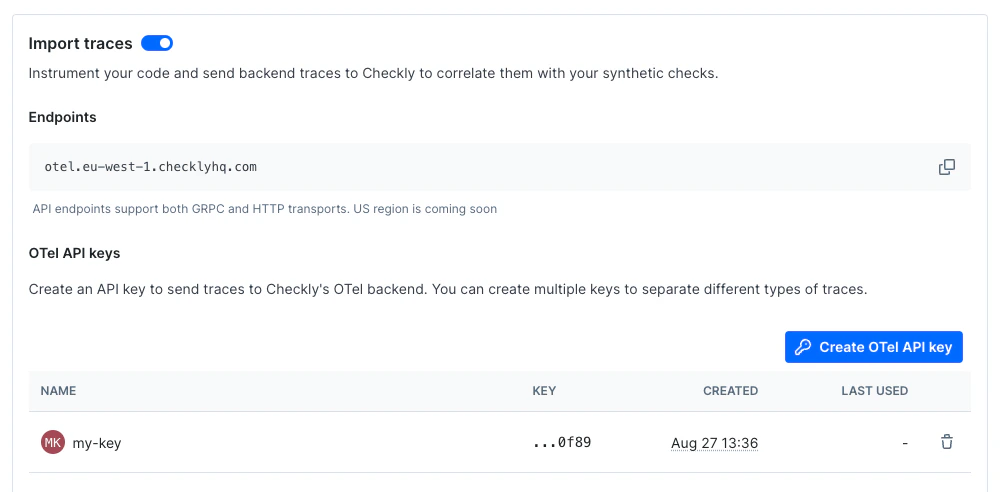 Now, export your API key in your shell by setting the
 OTEL_EXPORTER_OTLP_HEADERS environment variable.
export OTEL_EXPORTER_OTLP_HEADERS="authorization=<your-api-key>"
export OTEL_EXPORTER_OTLP_ENDPOINT="https://otel.eu-west-1.checklyhq.com"
export OTEL_SERVICE_NAME="your-service-name"
export OTEL_EXPORTER_OTLP_PROTOCOL="http/protobuf"
| Variable | Description |
|---|
OTEL_EXPORTER_OTLP_HEADERS | The Authorization HTTP header containing your Checkly OTel API key. |
OTEL_EXPORTER_OTLP_ENDPOINT | The Checkly OTel API endpoint for the region you want to use. |
OTEL_EXPORTER_OTLP_PROTOCOL | The protocol to use for the OTLP exporter. |
OTEL_SERVICE_NAME | The name of your service to identify it among the spans in the web UI. |

